
FuerisTechnologies
Ver · Guide

The Ver user guide

How to find your way around Ver: the nine ways to explore Tamil, listening to anything read aloud, the games and quizzes, saving favourites, and making Ver yours in Settings.

For learners of every age, and families learning Tamil together

  1. 01Install & choose a language
  2. 02Explore from Home
  3. 03Listen to it read
  4. 04Play a game
  5. 05Save favourites

Part 1Getting started

Get Ver

On your phone, your tablet, or in a browser.

Ver is free on Google Play and the App Store, as Ver The Root of Tamil. The download page has both links and QR codes to scan with your phone’s camera. Or use Ver on the web, with nothing to install.

There’s no account and no sign-in. Your favourites, scores and settings are kept on your device.

The first time you open Ver

A short welcome, in the language you choose.

Ver opens with a short welcome: what Ver is, the nine ways to explore Tamil, reading it in your own language, playing and listening, and saving favourites. Tap Next to go through it, Skip to leave it, or Get Started at the end.

Every meaning, story and quiz question can be read in one of more than 50 languages. You can change yours at any time in Settings.

Tip To see the welcome again, open Settings and tap How to Use Ver.

Getting around

Four tabs along the bottom.

TabWhat’s there
HomeThe Proverb of the Day and the nine ways to explore Tamil
GamesQuizzes and games built from everything in Ver
FavoritesEverything you’ve saved with the heart
SettingsLanguage, sound, the narrator, and help
Ver’s Home screen, with the four tabs along the bottom
  1. Home
  2. Games
  3. Favorites
  4. Settings

Part 2Exploring Tamil

The Home screen

A proverb a day, and nine ways in.

At the top is the Proverb of the Day, a new one every 24 hours. Tap Read more to open it, or play it to hear it read.

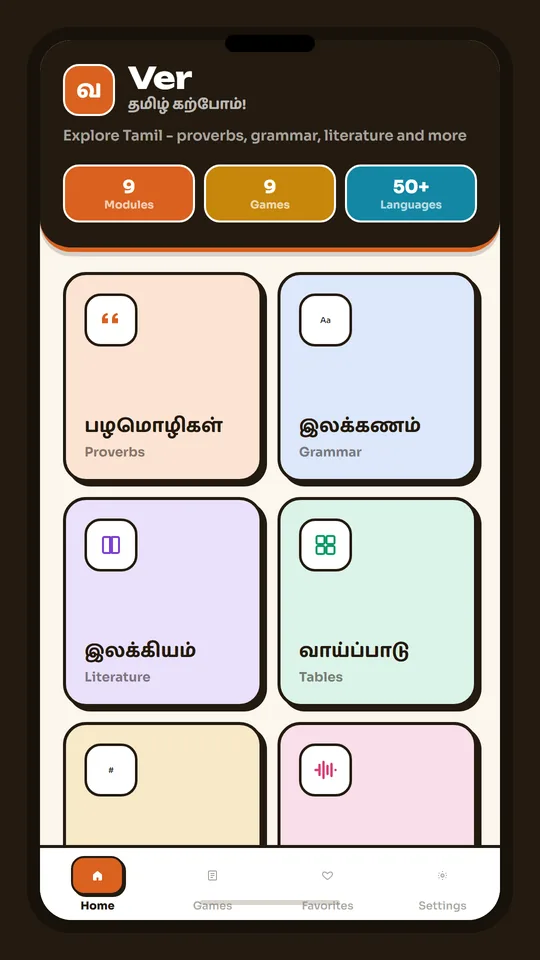
Below it are the nine ways to explore, each with its Tamil title: Proverbs, Grammar, Literature, Tables, Numbers, Sounds, Shapes, Measurements and Calendar. Tap one to open it.

Ver’s Home screen: the counts at the top and the ways to explore below
  1. 9 modules, 9 games, 50+ languages
  2. Proverbs: tap a way in to open it
  3. Grammar

Proverbs

Each with its meaning, a story and a note.

  1. Open Proverbs. Browse by theme, such as Wealth & Work, Wisdom & Learning or Relationships, or search with Search proverbs....
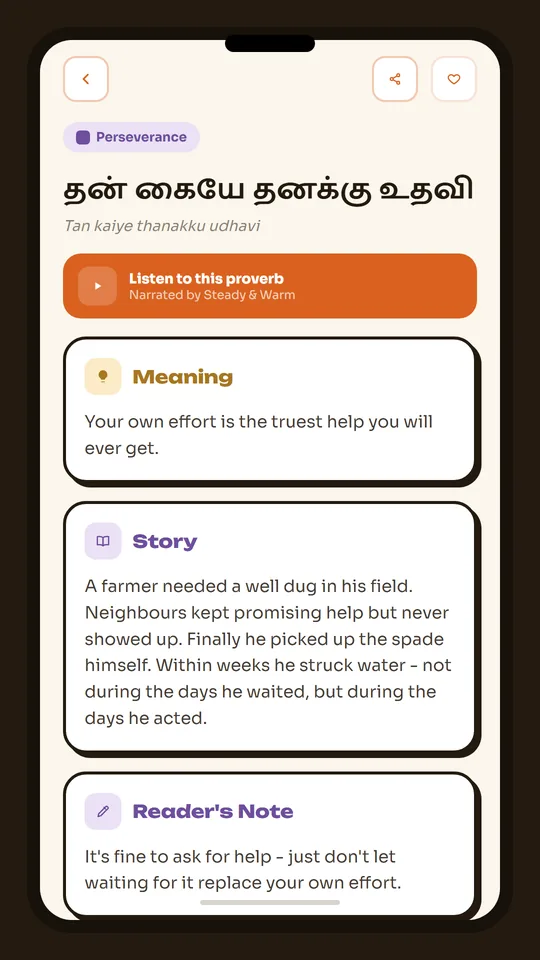
  2. Tap a proverb to open it: its Meaning, a short Story and a Reader’s Note.
  3. Tap play to hear it read aloud, the share button to send it to someone, or the heart to save it to Favorites.

Good to know Proverb wordings can vary by region and source; Ver gives one traditional form.

A proverb open in Ver, with its meaning, story and reader’s note
  1. Listen: hear it read aloud
  2. Meaning
  3. Story
  4. Reader’s Note
  5. Save to Favorites

Literature

Classical Tamil works, chapter by chapter.

Open Literature for selections from Thirukkural, Aathichudi, Moothurai, Kondraivendhan, Nanneri, Nalvazhi, Iniyavai Narpathu and Innaa Narpathu. Choose a work, then a chapter, to read its verses with their meanings. Use Search literature... to find a word or line, and About this work for its author and background.

Grammar and Sounds

How Tamil is built, letter by letter.

  • Sounds: the Tamil script’s base sounds, as Vowels, Consonants and Special. Tap any letter to hear it.
  • Grammar: the traditional five-fold grammar of letters, words, meaning, prosody (Prosody) and rhetoric (Rhetoric). Open a topic for its explanation and an Example.

Tables, Numbers, Shapes, Measurements and Calendar

Everyday Tamil, from counting to the calendar.

  • Tables: multiplication tables (vaipaadu) from 1 to 20, spoken as full Tamil sentences. Tap Play whole table to hear a whole table, and Stop to stop.
  • Numbers: Tamil numbers, and how they are written and spoken.
  • Shapes: Flat Shapes and Solid Shapes in traditional Tamil words.
  • Measurements: Tamil units of Length, Weight, Volume and Time, with their metric equivalents.
  • Calendar: the Tamil Days, Months, Seasons and Years, including the 60-year cycle.

Listen to it read aloud

Proverbs, stories and more, narrated.

Tap Listen to this content on a proverb, a story or most other content, and Ver reads it aloud (Now narrating...). Tap it again to stop.

Make it sound right for you

  1. Open Settings and tap Narrator Character.
  2. Under Speed & Pitch, slide Speed and Pitch until it suits you. Tap Play Sample to hear it (“This is how your narrator will sound.”).
  3. Under Voice, pick one of your phone’s voices for the language: Phone default, or one marked High quality (some say Needs internet).
  4. Tap Done. Reset goes back to the phone’s settings.

Good to know The voice itself comes from your phone’s text-to-speech settings. If your phone has no voice for a language yet, Ver asks first: tap Use English to listen in English, or I’ll download it to add one. On an iPhone, voices are under Settings › Accessibility › Spoken Content › Voices.

Part 3Games and favourites

Games and quizzes

Test yourself on everything in Ver.

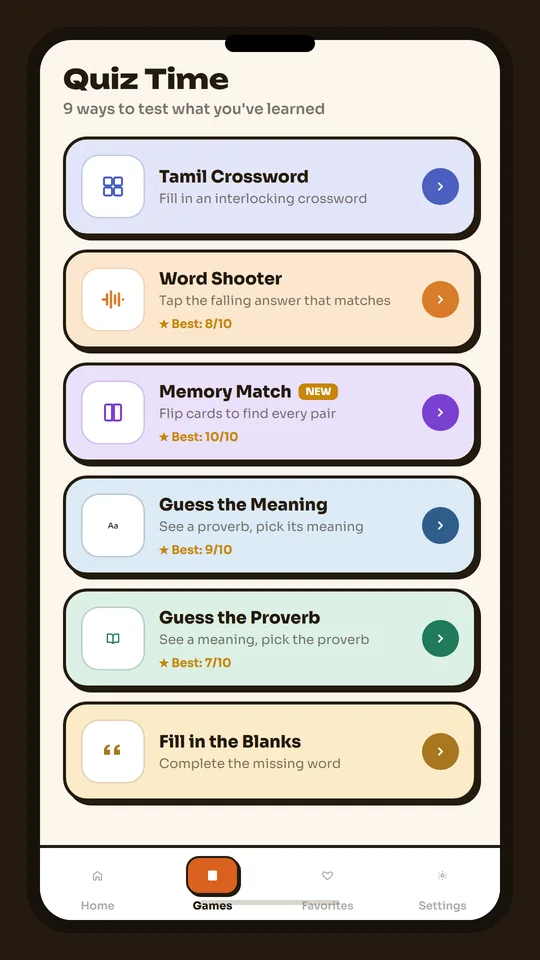
Open the Games tab and pick one. Your best score for each is kept (Best), so you can try to beat it.

GameHow it works
Tamil CrosswordFill in an interlocking crossword built from every section
Word ShooterTap the falling answer that matches the Tamil word shown
Memory MatchFlip cards to find every Tamil-transliteration pair
Guess the MeaningSee a Tamil proverb, pick its correct meaning
Guess the ProverbSee a meaning, pick the matching proverb
Fill in the BlanksComplete the missing word, from every section of the app
True or FalseJudge a statement: facts and near-miss fakes
Odd One OutThree belong together, one doesn’t: spot it

At the end you see Your Score. Tap Play Again for another round, or Back to Home.

Ver’s Games tab, listing the quizzes and games with your best scores
  1. Tamil Crossword: tap to play
  2. Your best score

Save favourites

Keep the proverbs you love together.

Tap the heart on any proverb to save it. Open the Favorites tab to find everything you’ve saved; tap the heart again to remove one.

Good to know Favourites are kept on your device, so they don’t move to a new phone or survive uninstalling Ver.

Part 4Settings

Make Ver yours

Language, sound and the narrator.

SettingWhat it does
LanguageThe language Ver and its meanings, stories and quizzes are shown in
Sound EffectsTurns the app’s sounds on or off
Narrator VoiceTurns reading aloud on or off
Narrator CharacterThe narrator’s speed, pitch and voice
Privacy OptionsYour choices about ads, where the law requires asking
How to Use VerShows the welcome again

At the bottom, About says what Ver is, with the app’s Version.

If something’s not rightTroubleshooting

Nothing plays when I tap play

Check Narrator Voice is turned on in Settings, and that your phone isn’t on silent with the volume down.

The narrator sounds different on another phone

Ver reads with each phone’s own text-to-speech voice, so it varies between phones. Pick another voice, or change the speed and pitch, in Settings › Narrator Character.

It says there’s no narrator voice for my language

Your phone has no text-to-speech voice for that language yet. Tap Use English to listen in English, or download a voice in your phone’s text-to-speech settings (on an iPhone: Settings › Accessibility › Spoken Content › Voices).

How do I change the language?

Open Settings and tap Language. Ver switches straight away, with no restart.

My favourites are gone

Favourites are kept on your device only, so they don’t carry over to a new phone or after reinstalling Ver.

Can I use Ver without installing it?

Yes: learnwithfueris.com/ver runs in any modern browser, with the same content, games and quizzes.

Let's talk

Still stuck?